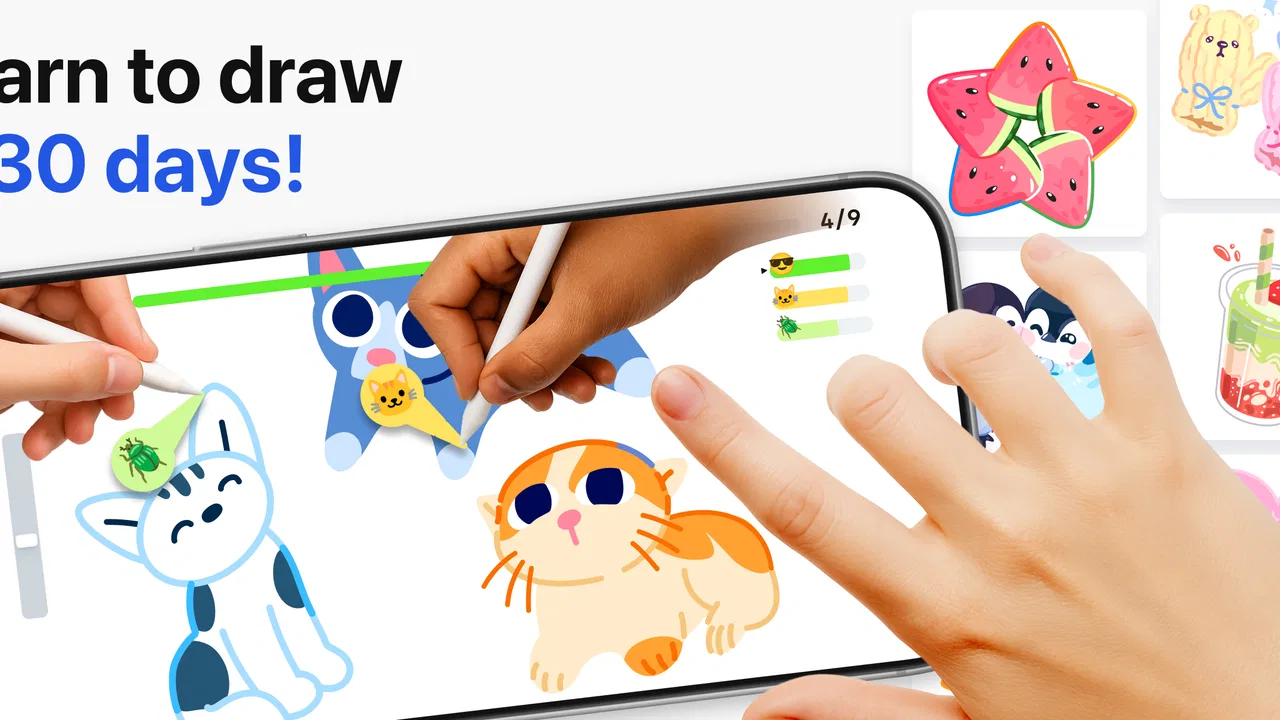
Learn how to draw - ArtWorkout
- 4.4
- Rating
- 10.00M
- Installs
- Free
- Price

 Analysis by App-foxy
I approached Learn how to draw - ArtWorkout as someone looking for a practical way to draw more often, not as a replacement for a full professional art studio. It sits in the Art & Design category and is made by ArtWorkout, but its appeal is broader than a simple sketching tool: it combines drawing practice with coloring, painting, handwriting, and a multiplayer drawing game. That mix makes it feel closer to a guided creative habit than to a blank canvas waiting for instructions.
My first impression was that the app is easiest to understand when you decide what you want from it. If you want a low-pressure activity for improving hand control, trying short drawing exercises, or sharing a playful art session with other people, it has a clear purpose. If you need precise layers, advanced brushes, professional file preparation, or a serious replacement for a desktop illustration program, I would look elsewhere.
It is free to install, rated for Everyone 10+, and works on Android 8.0 or newer. The current version is 0.1.71. Its average rating is 4.4 from around 247 thousand ratings, and it has passed 10 million installs, so this is not an obscure experiment with no audience. Still, popularity does not remove the need to check whether its learning-focused style matches the way you like to create.
You May Also Like

 Blood Strike: 2.5 Anniversary
Blood Strike’s Loadouts Turn Every Drop Into a Tactical Gamble
A close look at Blood Strike’s custom loadouts: how fast access to signature weapons reshapes its battle royale rhythm, rewards preparation, and narrows the gap between fights.

 Pandora - Music & Podcasts
Pandora’s Music Is Easy to Start, but Harder to Recover
Pandora’s strength is its low-effort path from a seed to a station. Its weak spot is how much confidence it asks you to place in connection, setup, and quiet recovery.

 8 Ball Pool
 Is Built on Rivalries, Rematches, and Routine
A close look at the rivalries, rematches, shared routines, and unanswered safety questions that turn a quick pool match into a persistent mobile community.

 Samsung Music
’s Quiet Strength Is Playing What You Already Own
Its reach comes less from spectacle than from dependable access to a personal library. That simplicity is both the app’s strongest retention engine and its ceiling.

 AccuWeather: Weather Radar
AccuWeather Review: A Quick, Clear Forecast for Everyday Decisions
For everyday plans, the best forecast is the one you can understand quickly. AccuWeather makes rain timing, radar, and local conditions easy to act on, with a few trade-offs.

 Hill Climb Racing
Why Hill Climb Racing Still Turns Crashes Into One More Run
A tiny car, a bumpy hill and one more upgrade: Hill Climb Racing keeps resurfacing because its simple chaos makes every near-miss feel personal.
More From Our News Desk



How I would decide whether ArtWorkout fits
I’d decide by looking at what usually stops me from drawing: getting started, staying interested, or making a specific finished piece. ArtWorkout is most compelling when practice and a little variety can help me build a routine; if my priority is detailed control, I’d test a dedicated drawing tool instead. That distinction also helps me judge whether its activities are likely to keep earning a place in my week.
Start with your reason for opening a drawing app
The most important question is not whether you can draw already. It is whether you want to practice, relax, compete, or produce finished artwork. ArtWorkout makes the most sense when practice is part of the goal. The app’s combination of sketching, painting, coloring, handwriting, and multiplayer drawing gives you several ways to stay engaged when a traditional drawing program feels intimidating.
I found that distinction useful because a blank canvas can be liberating for an experienced artist but uncomfortable for a beginner. With no prompt or structure, it is easy to spend more time choosing tools than actually drawing. A guided approach can lower that barrier. It encourages you to make a mark quickly, accept imperfect results, and return for another attempt instead of treating every page as a final portfolio piece.
Someone choosing between this and a conventional art app should therefore compare the workflow, not just the brush selection. ArtWorkout is built around doing. A standard sketching app is usually better when you already know what you want to make and need control over the process. I would choose this app for momentum and repetition, while choosing a more traditional canvas for detailed illustration.
Think about the device and your preferred input
On a phone, the practical advantage is convenience. You can use a short break to work on a small drawing instead of setting up a larger creative workspace. That makes the app suitable for commuting, waiting rooms, or a quiet evening when you want something more active than scrolling. The trade-off is familiar: a phone screen gives you less room for broad gestures and fine corrections than a tablet.
If you own a stylus, I would use it whenever possible, especially for handwriting, controlled outlines, and small details. Finger drawing remains useful for casual play and quick color work, but it can make accuracy harder. This is one of the app’s less obvious decision points: the same exercise may feel relaxed with a stylus and frustrating with a fingertip, so your hardware changes the experience more than the app’s category label suggests.
The Android requirement is reasonably accessible for people using older compatible devices, but performance and comfort will still depend on the screen and touch response of the phone or tablet. I would test the basic drawing feel before committing to regular use. A drawing app can be technically compatible and still feel cramped on a small display.
Separate learning value from entertainment value
The multiplayer drawing game element gives ArtWorkout a social and playful side that a solitary sketchbook does not provide. It can make practice feel less like homework, particularly for users who lose motivation when exercises become repetitive. Coloring and painting offer a softer entry point, while handwriting can turn the app into a way to work on steadier strokes without making the session feel like formal handwriting drills.
That variety is valuable, but it also means the app may not suit someone who wants a single, focused curriculum. I would not expect every activity to improve the same skill at the same pace. Coloring can help with patience and visual decisions, while sketching asks for observation and line control. Multiplayer play may improve confidence and willingness to participate, but it is not the same as studying anatomy, perspective, or composition in depth.
Where the app wins in everyday use
Its strongest advantage is reducing the distance between deciding to practice and actually starting. I can imagine opening it after dinner, choosing a short creative activity, and finishing something before the evening disappears. That matters for beginners who do not yet have a personal routine. The app’s range also helps prevent one difficult exercise from ending the whole session.
A realistic use case would be a student who wants a creative break after studying. Instead of opening a complex illustration program and worrying about making a polished image, they can spend a few minutes sketching, move to coloring when they want less pressure, and try a multiplayer activity when they want interaction. The result may not be a finished artwork worth exporting, but the habit of practicing is often more important at that stage.
I also see value for adults who want to return to drawing after years away. The app can make the first steps feel approachable because it does not require a complete personal art setup. You do not need to prepare a collection of brushes or decide which canvas dimensions are correct before beginning. That simplicity is a genuine strength, especially for people who are interested in drawing but tend to postpone starting.
Small workflow choices that improve the experience
My first tip is to treat each session as a focused experiment rather than a test of talent. Pick one mode and one small goal: steadier lines, more confident shapes, cleaner handwriting, or simply finishing the activity. Switching constantly between every available style can be entertaining, but it makes progress harder to notice.
My second tip is to use the multiplayer side strategically. It is most useful when you need motivation or a reason to draw on a day when you would otherwise skip practice. It is less useful when you are trying to study a specific weakness in silence. In that situation, I would stay with sketching or handwriting and repeat the same kind of movement instead of chasing novelty.
A third useful habit is to compare your own attempts over time rather than judging one drawing in isolation. Beginner-focused tools can feel disappointing if you expect instant improvement. Keeping mental notes about how a line felt, how quickly you started, or whether you finished the task gives you better feedback than asking whether the result looks professional.
Finally, I would use the app in short, repeatable sessions. The combination of game-like activities and art practice is well suited to consistency, but it can become scattered if you open it without a purpose. A simple routine—warm up with handwriting, sketch briefly, then finish with coloring or a multiplayer activity—can make the different parts feel connected.
Where traditional alternatives may fit better
The biggest limitation is that a guided and playful drawing app cannot provide the same working environment as a full illustration tool. If your priority is advanced control over layers, detailed editing, large compositions, or a carefully managed production workflow, a dedicated drawing application will probably be the better choice. I would not move a serious commission into ArtWorkout simply because it is easier to open.
A paper sketchbook may also be a stronger alternative for people who want tactile feedback and complete freedom from screen distractions. Paper encourages loose exploration and makes the act of drawing feel separate from games or digital entertainment. ArtWorkout wins on convenience and variety, but it cannot reproduce the resistance of a pencil on paper.
For structured art education, a course or teacher may fit better than an app centered on repeated activities and playful practice. A human instructor can identify why a particular drawing is not working and adjust the lesson around that problem. ArtWorkout is more suitable as a regular companion for practice than as the only source of serious instruction.
There is also a question of social preference. Multiplayer drawing can be motivating for one person and distracting for another. If you prefer private, uninterrupted work, a simple offline sketching tool or notebook may feel calmer. If you enjoy shared challenges and need external energy to keep going, ArtWorkout has a clear advantage over a completely solitary canvas.
What the free model means for a new user
The app is free to download, which makes trying the basic experience relatively easy. In-app purchases range from $4.99 to $59.99 per item, so I would pay attention to how much of your preferred routine depends on optional purchases before treating it as a long-term tool. The difference between casually exploring an app and relying on it every day can make the cost feel very different.
My advice is to begin without assuming that paying will automatically improve your drawing. First decide whether you enjoy the activities, whether the touch controls feel comfortable, and whether the app actually helps you practice. If the free experience already fits your routine, you can then judge any purchase by the specific value it adds rather than buying out of curiosity.
This is also where switching costs matter. Moving away from ArtWorkout later is easy if you use it mainly for casual practice, because the central benefit is the habit rather than a complicated project library. The switch becomes more noticeable if you rely on its particular activity mix or social element. A conventional drawing app may give you more control, but it may not provide the same reason to return regularly.
Parents and younger users should also consider the age rating of Everyone 10+ when deciding whether it is appropriate for a particular child. The rating makes it more suitable for a broad audience than an adult-only creative service, but I would still look at how the individual user responds to competitive or social activities. The best experience depends not only on age but also on whether the person enjoys guided digital play.
Who should choose it, and who should skip it
I would recommend ArtWorkout to beginners who want a friendly starting point, casual artists who need help building a routine, and people who enjoy mixing solo creativity with multiplayer play. It is also a sensible choice for anyone who wants to practice on a phone without first learning a complicated professional interface. The app is especially appealing if you often say you want to draw but rarely find the time to begin.
I would be more cautious about recommending it to experienced illustrators who need a precise production workspace. I would also suggest skipping it if you dislike game-like motivation, want a purely private sketchbook experience, or expect a complete art education in one app. Those users may be happier with paper, a dedicated sketching tool, or a structured course.
For someone deciding between ArtWorkout and a standard drawing app, my rule is simple: choose ArtWorkout when starting and returning are the hard parts; choose the standard tool when control and finished output are the hard parts. Neither approach is universally better. They solve different problems.
My recommendation after weighing the trade-offs
ArtWorkout works best as a practice companion with enough variety to keep drawing from feeling like a chore. Its blend of sketching, painting, coloring, handwriting, and multiplayer activity gives it a distinct personality, and the free entry point makes it easy to see whether that personality suits you. I appreciate that it does not demand that every session produce impressive art. That lowers the pressure and makes experimentation more realistic.
At the same time, I would keep expectations grounded. This is not the app I would choose for complex digital illustration, meticulous editing, or a professional asset workflow. Its value comes from accessibility, repetition, and playful engagement. If those are the reasons you want to draw, the trade-off is worthwhile. If they are not, the extra variety may feel like clutter around a task you would rather do more directly.
My final recommendation is to try it as a low-commitment way to establish a drawing habit. Use a stylus if you have one, choose a clear goal for each session, and judge progress by consistency as well as image quality. With an average rating of 4.4 and more than 10 million installs, it has clearly connected with a large audience, but the right question is still personal: do you want a playful coach that gets you drawing, or a blank professional canvas that stays out of your way?
For the first need, I think ArtWorkout is a strong choice. For the second, I would choose a more specialized alternative and keep this app nearby for warm-ups, casual challenges, or the days when motivation matters more than technical control.
FAQs for Learn how to draw - ArtWorkout
01What features does ArtWorkout offer for beginners?
ArtWorkout provides a variety of features specifically designed for beginners, including step-by-step tutorials, guided drawing exercises, and an intuitive interface. The app includes a range of basic to advanced lessons, making it easier for users to progress from simple sketches to more complex artwork. Additionally, it offers video tutorials and practice sessions to enhance learning.
02Is ArtWorkout suitable for professional artists?
While ArtWorkout is primarily designed for beginners and intermediate users, it also offers features that can benefit professional artists. These include advanced tools, customizable brushes, and the ability to import and export high-resolution images. The app also provides a platform for artists to share their work and gain feedback from a community of peers.
03Does ArtWorkout require an internet connection?
ArtWorkout offers both online and offline modes. While internet connectivity is recommended for accessing the latest tutorials, community features, and cloud storage, the app allows users to download lessons for offline use. This flexibility ensures that users can continue learning and practicing even without an internet connection.
04Are there any in-app purchases or subscriptions in ArtWorkout?
ArtWorkout is free to download, but it offers in-app purchases and subscription options for premium content. These may include access to exclusive tutorials, advanced tools, and ad-free experiences. Users can choose to purchase individual items or subscribe for full access, with prices varying based on the selected plan.
05How does ArtWorkout support user progress and improvement?
ArtWorkout tracks user progress through personalized learning paths and provides feedback based on completed exercises. The app includes features like skill assessments, progress reports, and the ability to set personal goals. Additionally, users can engage with a supportive community to share their work and receive constructive critique, fostering continuous improvement.
Pros
- User-friendly interface for beginners.
- Wide variety of drawing exercises.
- Includes step-by-step tutorials.
- Regularly updated content.
- Offline mode available.
Cons
- Limited free content access.
- Ads can be disruptive.
- Requires in-app purchases.
- Occasional bugs in tutorials.
- Some features need premium subscription.

Learn how to draw - ArtWorkout
Gallery